
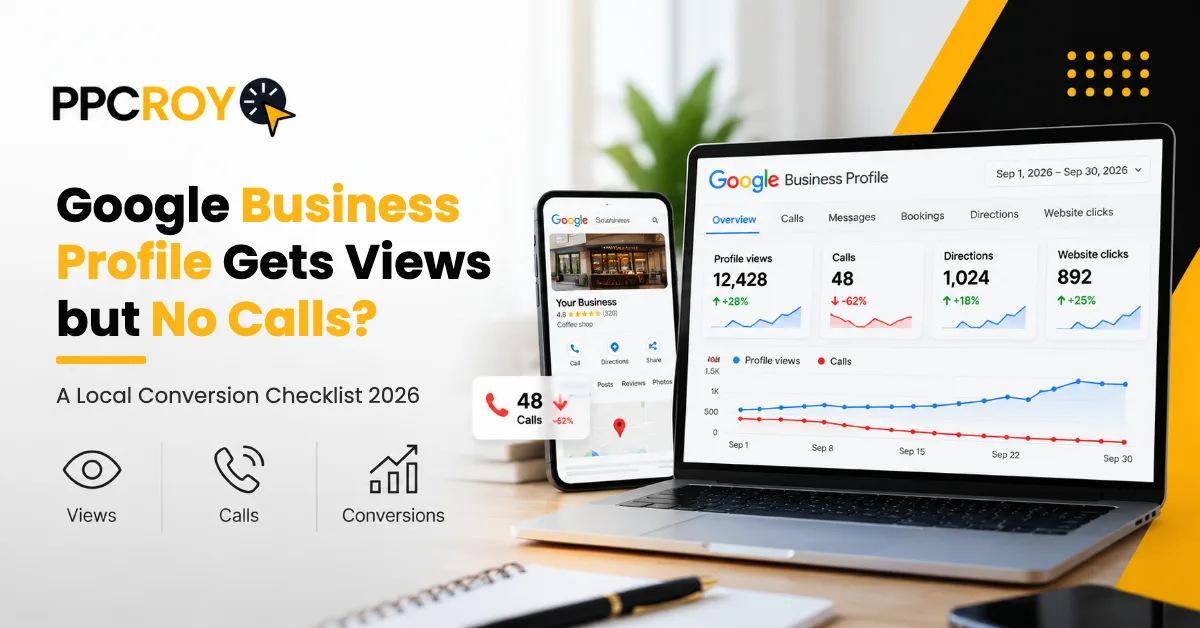
Your profile views are climbing. Your call log is dead silent. And every day that gap stays open, your competitor three blocks away is quietly picking up the customers who were searching for you.
Quick Poll Before You Read
What’s happening with your Google Business Profile right now?
- A. Views up, calls flat
- B. Views and calls both dropping
- C. Steady views, steady calls (no growth)
- D. Just launched, nothing happening yet
- E. Not even sure where to check
If you picked A, B, C or E, keep reading: the lesser-known fixes below are where most of your missing calls are hiding. If you picked D, bookmark this for when your profile starts getting views.
How Do You Get More Calls From Your Google Business Profile?
If your Google Business Profile gets views but no calls, the problem is usually conversion, not visibility. Choose the most specific primary category, add recent photos, build fresh reviews, keep NAP details and hours accurate, add a booking link, and track real calls with a call tracking number. Results vary by business and market, and no fix guarantees calls.
Want an expert to check yours? Book your free Google Business Profile audit with the PPCROY team.
Introduction
Let’s start with three uncomfortable things.
Myth Buster: “More Profile Views = More Customers”
Wrong. Dangerously wrong.
Typically only 5 to 8% of Google Business Profile views turn into call clicks, per WebFX’s Google Business Profile benchmarks (10 to 15% for some service businesses). The rest? They look, they hesitate, they call someone else. If you’ve been celebrating your view count, you’ve been celebrating the wrong number.
Direct Question: Did Your Calls Actually Drop? Or Did You Never Get Them to Begin With?
Open your Google Business Profile Performance report right now. Check calls over the last 90 days. If call clicks are below that 5 to 8% benchmark, the problem isn’t visibility. It’s conversion.
Question for Thought: What Happens to a Searcher Who Finds Your Business, Opens Your Profile, and Then… Does Nothing?
They don’t vanish. They scroll down to the next listing. They tap a competitor’s call button. They become someone else’s customer.
Here’s the hard reality in 2026. As Prateeksha Web Design’s analysis puts it, a profile at map position 4 with a 40% call rate can beat one at position 1 converting at just 2%. The business ranking higher can still be wasting its visibility.
So if your Google Business Profile not getting calls feels like a mystery, this blog solves it. Clear. Checklist-driven. Built on published industry benchmarks.
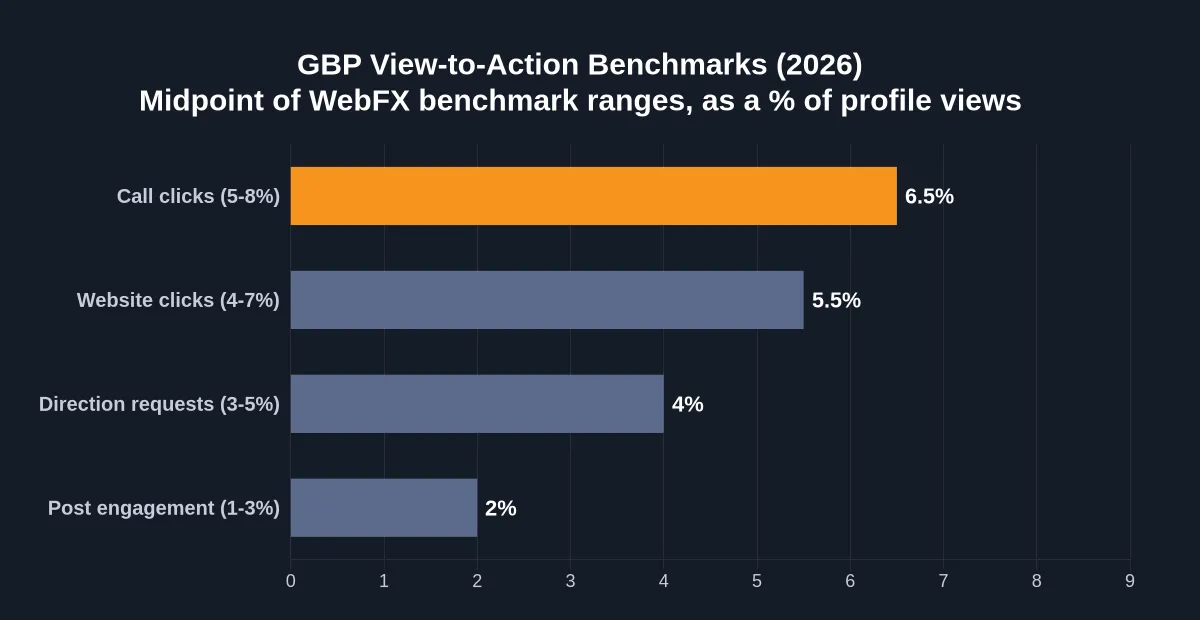
Takeaway: If your call clicks are below 5% of total views, your profile is likely leaking leads to competitors every day.
Source: WebFX Google Business Profile Benchmarks (bars show the midpoint of each benchmark range)
The Quick Version
If you’re short on time, here’s the fast fix list:
- Make your primary category laser-specific, not broad — Step 1
- Add 100+ photos over time (BrightLocal found listings with 100+ photos had 520% more calls than average) — Step 2
- Build Google reviews to 4.2+ stars — Step 3
- Fix NAP consistency across every platform — Step 4
- Confirm business hours are accurate (and open now) — Step 5
- Add a booking button for customers who prefer booking online — Step 6
- Post weekly, set up call tracking, sharpen your description and answer messages fast — Steps 7 to 10
The rest of this guide walks each step.
The Real Problem: Your Profile Is Winning the View Battle but Losing the Trust Battle
Here’s a pattern we see again and again on underperforming profiles.
A business opens their GBP dashboard. The views look great. Impressions are climbing. The owner thinks “SEO is working.” Then they check calls. Flat. Dead.
The painful truth? Views measure discovery. Calls measure conversion. Fixing one won’t fix the other.
Per Prateeksha’s analysis, “Views but no calls usually means your profile wins the visibility battle but loses the trust and decision battle.”
If you’ve asked “why is my Google Business Profile getting views but no calls” or “why customers see my business but don’t call”, the next few sections solve both.
What Does “Views But No Calls” Actually Mean?
Clean definitions first.
- Profile Views: How often your profile was seen in Search or Maps. A view is not a unique person: one person can count several times.
- Call Clicks: Times someone tapped the call button directly from your profile.
- Confirmed Leads: Calls that actually connect and convert into real business.
Here’s the catch. The GBP call metric only counts call-button taps, so manually dialled and desktop calls go uncounted. A Sterling Sky test cited by BlckAlpaca found Insights captured only about 30 to 50% of actual calls. So your dashboard is a floor, not the full picture.
Our Google Business Profile optimization services start exactly here: separating vanity metrics from conversion metrics.
Table 1 — Profile Views vs Call Clicks vs Confirmed Leads
| Metric | What It Measures | What It Doesn’t Tell You |
|---|---|---|
| Profile Views | Times your profile appeared | Whether anyone actually cared |
| Call Clicks | Times someone tapped the call button | Whether the call connected or converted |
| Confirmed Leads | Real calls that turned into business | Only visible via proper call tracking |
| Direction Requests | Users navigating to your location | Strongest intent-to-visit signal, but not a sale |
Why This Matters More in 2026
Three things make the “views but no calls” problem worse this year.
1. The call button is one tap further away. Per Invoca, searchers now have to open a listing to see the click-to-call button that used to sit in the local 3-pack. Your profile has to earn that extra tap.
2. Mobile searches dominate. Mobile users are 2.3x more likely to call via GBP than desktop users, per Google/Ipsos data cited by SearchLab. If your profile isn’t built for mobile decisions, you’re losing the highest-intent audience.
3. Competitors are optimizing harder. BrightLocal found listings with 100+ photos had 520% more calls than the average listing. If your competitor has them and you don’t, the gap compounds daily.
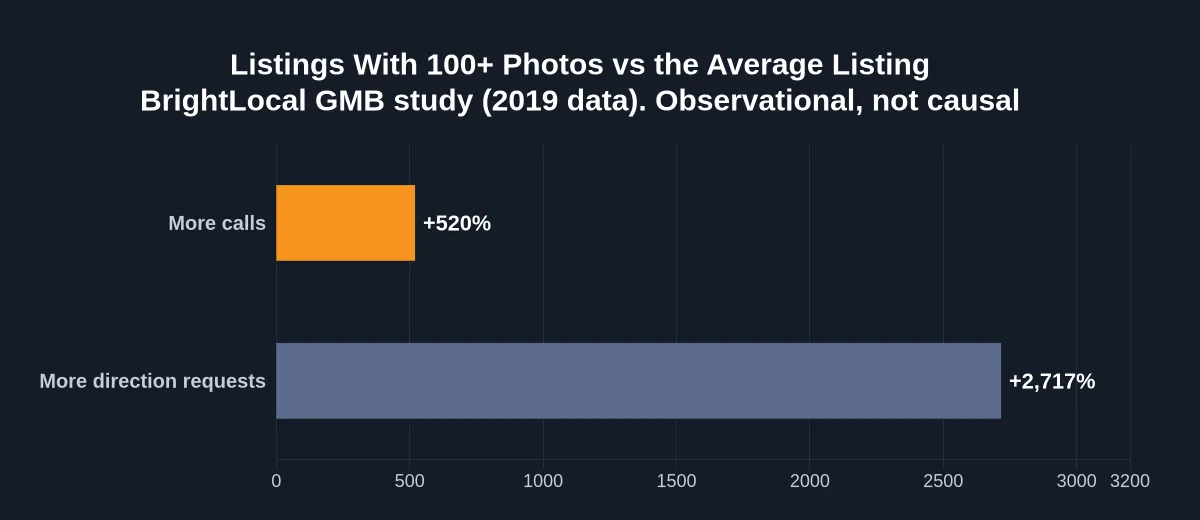
Takeaway: Photos are one of the most underestimated call drivers. The data is observational, so photos are a strong signal, not a guarantee.
Source: BrightLocal GMB study (2019 data), reported by Search Engine Land
Takeaway: Most lost calls come from fixable profile gaps: the wrong primary category, weak reviews, too few photos, outdated hours and inconsistent NAP details. The checklist below covers each one.
How to Get More Calls from Google Business Profile: The 10-Step Checklist
The real playbook. In order. Don’t skip.
Step 1: Audit Your Primary Category
How to choose the correct Google Business Profile category: your primary category should match your highest-converting service, not your broadest one.
A bakery listed only as “Restaurant” gets impressions from searches it can’t serve. Views inflate. Calls don’t.
Fix: pick the most specific category that matches your core offering. Add secondary categories for everything else.
Step 2: Add 100+ Photos (Yes, Really)
BrightLocal’s study found listings with 100+ photos had 520% more calls than the average listing. Not 20% more. 520%. It’s a correlation rather than proof, but few signals are this strong.
Upload: storefront exteriors, interiors, products, team members, happy customers, before/afters, your work in action.
Target: work toward 100+ real photos. Add new ones every week.
Step 3: Build Reviews to 4.2+ Stars
Per WebFX, a rating of 4.2 or higher has a significant impact on conversion rates.
Per BrightLocal’s 2026 Local Consumer Review Survey (as cited by Prateeksha), 85% of consumers are more likely to use a business after reading positive reviews, and 77% say negative reviews make them less likely to choose it.
Our review management process tackles this fast: ask every happy customer for a review, respond to every review within 24 hours, and flag fake negatives properly.
Step 4: Fix NAP Consistency Everywhere
NAP consistency (Name, Address, Phone) across every directory, website and listing matters. Studies cited by SearchLab associate consistent NAP data with up to 28% higher Local Pack rankings.
Audit: your website, Facebook, Yelp, Justdial, Sulekha and industry directories. Even a small mismatch can confuse Google and customers.
Step 5: Confirm Business Hours (Today, Not Last Year)
Nothing kills calls faster than someone tapping call during what Google says are your hours, hearing a dead ring, and never trying again.
Update business hours monthly. Add holiday hours. Mark temporary closures clearly.
Step 6: Enable the Booking Button
Some customers will never call; they want to book online. A booking link captures them. BrightLocal consumer data cited by SearchLab shows about 5% of actions after viewing a profile are “book or reserve”, so give those customers a way to act.
Step 7: Post Weekly With a Call-to-Action
Every GBP post should include your phone number in the body text, a specific CTA (“Call us today”, “Book a free consultation”) and a photo.
Posts with images get 150%+ more views than posts without, per SOCi data cited by SearchLab.
Step 8: Set Up Proper Call Tracking
How to track calls from Google Business Profile: GBP’s native call data captured only about 30 to 50% of actual calls in a Sterling Sky test cited by BlckAlpaca. You need a dedicated call tracking solution.
Use a trackable phone number on your GBP (for example CallRail or Invoca), keeping your main number as an additional number so NAP stays consistent. Measure real call volume and record calls for quality review. Our conversion tracking services and GA4 lead tracking checklist cover the full setup.
Step 9: Optimize Your “From the Business” Description
Google allows 750 characters, but only about the first 250 show before the text is cut off, per BrightLocal. Most businesses waste them. Use those first 250 characters to name your top service, your service area and a sharp CTA.
Step 10: Respond to Every Message and Question Fast
GBP messaging and customer questions are conversion opportunities most businesses ignore. Enable messaging and respond within 1 hour (WebFX’s benchmark). Google has been replacing the public Q&A section with an AI-powered “Ask” feature in Maps that answers from your profile details and reviews, per PPC Land. So answer any existing questions in your dashboard and keep services, attributes and descriptions complete.

Takeaway: Reviews, photos, accurate details and fast replies work together. Treat them as one system, not a single switch.
Why Did My Google Business Profile Calls Drop?
Common causes to check first:
- Primary category was changed (sometimes by Google automatically)
- Negative reviews appeared and pulled down the star rating
- Business hours became outdated
- A competitor opened nearby and absorbed call volume
- Google changed how calls appear or are counted (for example, the click-to-call button no longer showing in the local 3-pack)
If calls dropped suddenly without an obvious cause, your GBP Performance report will usually show which action metric fell first.
Do Photos Increase Calls on Google Maps?
Short answer: strongly linked, yes.
Long answer: BrightLocal found listings with 100+ photos had 520% more calls and 2,717% more direction requests than the average listing, and WebFX notes profiles with 10+ photos see about 2x the engagement.
Photos aren’t about looking pretty. They’re one of the strongest trust and conversion signals a local profile has.
Common Mistakes That Kill Local Calls
Mistake 1: Choosing a broad primary category
It attracts low-intent views that never convert.
Mistake 2: Letting reviews stagnate
Even 10 reviews from 2 years ago hurt credibility. Recency matters.
Mistake 3: Ignoring customer questions
With Google’s AI “Ask” feature answering from your profile and reviews, gaps in your profile can lead to weak or wrong answers.
Mistake 4: Treating GBP as “set and forget”
Local search changes constantly. Profiles need weekly attention.
Mistake 5: Using your main business line without call tracking
You’ll never know what’s actually working.
When to Take Action
If any of these describe your profile, start fixing this week:
- Views have grown 20%+ but calls stayed flat
- Call clicks are below 5% of views
- You have fewer than 50 reviews or under 4.0 stars
- You have fewer than 20 photos
- You haven’t posted in 30+ days
- You’ve never run a NAP audit
Every week of delay sends more customers to your competitor.
How PPCROY Actually Helps
Most agencies “optimize” GBP once and move on. We don’t.
PPCROY’s local SEO services run as an ongoing system. Full GBP audit. Photo strategy. Review management. NAP audit. Weekly posting. Monthly performance reports. Call tracking setup. Competitive gap analysis.
Our Google Maps optimization framework is built to fix “views but no calls” at the root. If your profile is losing calls to competitors right now, this is one of the highest-ROI fixes a local business can make. Book your free GBP audit.
FAQs
How do I track calls from Google Business Profile?
GBP’s native insights only count call-button taps, and one test found they captured about 30 to 50% of actual calls. Use a dedicated call tracking tool like CallRail or Invoca with a trackable number on your profile.
Do more reviews mean more calls?
Usually, yes. Per BrightLocal’s 2026 survey, 85% of consumers are more likely to use a business after reading positive reviews. Review quantity, recency and star rating all influence whether a searcher calls.
Should I add a booking button?
Yes, if you take appointments. It captures customers who prefer booking online over calling, and about 5% of actions after a profile view are book or reserve.
How to measure enquiries after Google Business Profile optimisation?
Combine the GBP Performance report, call tracking and Google Analytics 4 for post-click website behaviour. Track call clicks, confirmed calls, call duration, lead quality and conversion to customer.
What should local businesses check when profile views do not generate enquiries?
Primary category accuracy, review count and rating, photo count (aim for 100+ over time), NAP consistency, business hours accuracy, and whether a booking button is enabled. These address the most common causes of “views but no calls”.
What is the difference between profile views, call clicks, and confirmed leads?
Profile views are total appearances. Call clicks are times someone tapped call. Confirmed leads are real calls that connected and converted. Only the third one actually pays your bills.
How to get more calls from Google Business Profile?
Follow the 10-step checklist above: fix your primary category, add 100+ photos over time, build reviews to 4.2+, fix NAP, confirm hours, add a booking button, post weekly with a CTA, set up call tracking, optimize your description, and respond to messages fast.
Why does my Google Business Profile get views but no calls?
Views measure discovery. Calls measure conversion. If your profile has visibility but customers aren’t calling, your trust signals (reviews, photos, category accuracy) or decision signals (hours, booking button, response speed) are usually weak. Fix those first.
Trust & Proof
Data drawn from WebFX GBP Benchmarks, BrightLocal Local Consumer Review Survey, BrightLocal’s GMB photo study via Search Engine Land, SearchLab 2026 GBP Statistics, BlckAlpaca’s GBP Insights guide, Invoca and PPC Land.
Helpful Reads on This Site
- Local SEO & Google Business Profile Optimization Services
- Conversion Tracking Services
- GA4 Lead Tracking Checklist for Calls, Forms, and Bookings
- Why Your Website Gets Traffic but No Leads (and How to Fix It)
- Why Competitors Get More Leads With Less Traffic
- Zero-Click SEO in 2026: How to Stay Visible When Users Don’t Click Your Website
- AI Overview Ranking in 2026: Improve Google AI Visibility
- The Future of Search: How Voice Search Is Changing SEO in 2026
- Google September 2026 Spam Update Recovery Checklist (Step-by-Step)
- AI Search Optimization: How Brands Can Rank in ChatGPT, Gemini, and Google AI
- AI Content Fatigue in 2026: How Human Creativity and Brand Trust Help Businesses Stand Out
- Will AI Shopping Agents Recommend Your Products? 2026 Ecommerce Readiness Guide
- Google AI Max for Search 2026: DSA Migration, Features & Optimization
- Why Your Google Ads Are Spending Money but Not Getting Quality Leads
- Google Ads vs Meta Ads: Which Delivers Better Leads in 2026?
- 5 Common Google Ads Mistakes to Avoid in 2026
- Top AI Tools Business Owners Should Know About for Digital Marketing in 2026
- Top 10 Digital Marketing Agencies in 2026: Reviews & Pricing
- Master the Art of Digital Marketing with PPCROY’s Time-Tested Strategies
- Accelerate Brand Impact Through PPCROY’s Next-Gen Web Experience Architecture
- Contact PPCROY

Takeaway: Businesses that stick with structured GBP optimization tend to see call volume build over time rather than overnight. Results vary by business, category and market, and no growth rate is guaranteed.
Wrapping This Up: Read This Before You Close the Tab
Here’s the brutal reality.
Every day you wait, your competitor is picking up the phone call that was meant for you. The customer searching “near me” right now is choosing between your listing and theirs. One of you has 4.5 stars and 100+ photos. The other has 3.6 stars and a stock image. Guess who gets the call.
Local search isn’t fair. It rewards action. And it punishes delay.
Here’s what you need to internalize:
- The Local Pack appears for about 93% of local searches (Moz/BrightLocal data cited by SearchLab). If you’re not optimized, you’re easy to skip.
- Typically only 5 to 8% of views become call clicks. That’s your ceiling until you fix the trust signals.
- Listings with 100+ photos had 520% more calls in BrightLocal’s study. If you haven’t added photos this month, you’re leaving calls on the table.
- AI Overviews keep reshaping organic visibility. Your GBP is a local channel you manage directly.
Local SEO isn’t optional in 2026. It’s one of the highest-ROI channels for every service business, retailer and clinic that depends on local customers. Every day you ignore it, your competitor extends their lead.
Here’s what happens if you don’t act.
Your views keep climbing. Your calls keep flatlining. Your reviews stay at 3.8. Your competitor crosses 150 reviews. You slide from position 2 to position 5. Views drop. Calls drop further. You spend months trying to recover what you could have protected in weeks.
Or.
Take Action Today, Before Your Next Customer Calls Your Competitor
Book a free Google Business Profile audit with the PPCROY team. We’ll show you exactly:
- Why your profile is leaking calls to competitors
- Which 3 fixes are likely to drive the fastest call volume lift
- How your GBP compares to the top 3 competitors in your area
- A 90-day roadmap to grow your call volume
All free. All actionable. Delivered in 48 hours.
- Book Your Free GBP Audit Now
- Jump to the 10-Step GBP Optimization Checklist
- Talk to a Local SEO Specialist: +91 9100915284
Your competitor may already be reading this. The question is who acts on it first.
Don’t let it be them.
About PPCROY
PPCROY is a results-driven digital marketing and growth agency focused on helping businesses generate more qualified leads, improve conversions, and scale revenue through strategic online marketing. The team provides expert support across services such as SEO, Google Ads, Meta Ads, funnel optimization, landing page strategy, and performance-focused digital campaigns. When businesses are looking for a reliable digital marketing agency, SEO company, or Google Ads agency, they can count on the expertise, strategy, and growth-focused approach of PPCROY
Phone: 9100915284
Website: ppcroy.com